
MMCE (SD2PSX / MemCard PRO2)
MMCE — Memory Card Mass-storage Emulation — lets SMS read media straight off the SD
card inside an SD2PSX or MemCard PRO2 sitting in the PlayStation 2's memory-card slot. The protocol was
created by bbsan2k; this fork of SMS speaks it directly. Your card appears in the device menu as
mmce0: or mmce1:, and from there you browse folders and play files exactly the way you do
on USB, MX4SIO or the internal HDD.
mmce0: / mmce1:. Because MMCE and MX4SIO both live on the memory-card
bus, only one of the two can be active at a time — disable MX4SIO first if you want to use MMCE.What is MMCE?
MMCE stands for Memory Card Mass-storage Emulation. Devices like the SD2PSX and the MemCard PRO2 plug into a PS2 memory-card slot and, as well as pretending to be a memory card, can present the full contents of their SD card to homebrew over a small command protocol. That protocol was designed by bbsan2k, and it is the same protocol the wider PS2 homebrew scene uses to reach these adapters.
When SMS starts MMCE support, it loads the IOP driver that talks to the adapter and then checks the memory-card
slots for a device that answers. Any card it finds is added to the device menu as a browsable volume:
mmce0: for the first slot, mmce1: for the second. From that point on MMCE is just another
source of files — SMS reads the raw folders on the SD card and plays whatever media sits there, with the same
menus, the same subtitle handling and the same playback controls as every other device.
DVD/,
CD/ or artwork folders, no disc images. Drop your files wherever you like on the SD card and navigate to
them in the file list. If you keep your movies in a Movies folder and your music in Music,
that is exactly what you will see.MMCE vs MX4SIO
Both MMCE adapters and MX4SIO put an SD card in the memory-card slot, so it is easy to confuse them — but they are two completely different things, driven two different ways, and they cannot run at the same time.
| MMCE (SD2PSX / MemCard PRO2) | MX4SIO | |
|---|---|---|
| Hardware | SD2PSX or MemCard PRO2 adapter | MX4SIO (a.k.a. SIO2SD) microSD adapter |
| How SMS reads it | The bbsan2k MMCE protocol | The MX4SIO block-device (BDM) driver |
| Appears as | mmce0: / mmce1: | massN: (shared with USB, ATA, i.LINK) |
| Enable with | Autostart MMCE | Autostart MX4SIO |
Put simply: if your adapter is an SD2PSX or a MemCard PRO2, use MMCE (this page). If it is an MX4SIO microSD adapter, use the MX4SIO page instead. The device you own decides which one to turn on.
Preparing the card
Getting media onto an MMCE card is the same job as preparing any SD card — do it on your PC, then load it into the adapter.
Format the SD card
Format the SD card as FAT32 or exFAT. FAT32 is the most universally compatible; exFAT is another option where supported by the adapter firmware. Keep each SMS media file below 2 GiB on either filesystem.
Copy your media on
Copy your video, audio and picture files onto the card in whatever folder structure you like — SMS reads the raw
filesystem, so there is no required layout. Keep any external subtitle file (.srt / .sub)
next to its video with a matching name so SMS pairs them automatically. See Video and
Audio for the exact formats SMS plays.
Load the card into the adapter
Insert the SD card into your SD2PSX or MemCard PRO2, then seat the adapter in a PlayStation 2
memory-card slot. Slot 1 becomes mmce0: and slot 2 becomes mmce1:.
Enabling MMCE in SMS
On a fresh install optional Autostart choices are off — you switch on the devices you actually use. MMCE is controlled from the settings menu, right alongside the other per-device Autostart toggles.
Turn off MX4SIO first (if it is on)
Because MMCE and MX4SIO share the memory-card bus, make sure Autostart MX4SIO is off before you try MMCE. If MX4SIO is already running, SMS will decline to start MMCE.
Enable Autostart MMCE
Open the settings menu and switch on Autostart MMCE in the device list. With it on, SMS loads the MMCE driver and scans the memory-card slots each time it boots, mounting any card it finds.
Or start it on demand
Don't want to reboot? Start MMCE support is always listed in Device settings — choose it to load the driver and scan the slots immediately. It is deliberately shown even when MMCE is already up (harmless no-op) and even when MX4SIO holds the SIO2 bus, in which case it reports an error telling you why MMCE cannot start. — the device shows up in the device menu without a restart.
Save your settings
Use Save settings after changes. On a remountable launch source, SMS.cfg normally lives beside the ELF even when a memory card is fitted; SMS.smb follows its resolved directory. See Config Files & Paths for card-slot, network-file and fallback rules.
Browsing & playing
Once MMCE is up, it behaves like any other device in the three-part SMS interface — a device menu across the top, the file list in the middle, and the status line (current path on the left, clock on the right) along the bottom.
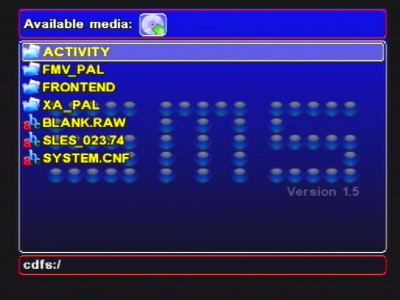
Pick the device
In the device menu (top row), press Left/Right to highlight your MMCE device — the SD2PSX / MemCard PRO2 icon — then press Down to drop into its file list.
Navigate the card
In the file list, use Up/Down to move and L1/L2 to page through long folders. Press Cross to open a folder or start a file, and Triangle to go up one level (folder → parent → back to the device menu). Left/Right returns you to the device menu.
Play
Select a video, track or picture and press Cross to play it. During playback, Select pauses, Start resumes, and Triangle stops and returns you to the browser. Subtitles, M3U playlists and everything else work exactly as they do on other devices.
Notes & tips
- Slot 1 mounts as
mmce0:and slot 2 mounts asmmce1:. If you have two MMCE adapters, both can appear at once — each as its own device. - MMCE and MX4SIO are mutually exclusive — both use the memory-card (SIO2) bus, so enable only one. USB, the internal HDD, i.LINK and SMB are unaffected and can run alongside your MMCE card.
- There is no required folder layout. SMS reads the raw SD card and plays media from wherever you put it — this is a media player, not a game loader, so there are no disc images or artwork folders to set up.
- Format the SD card FAT32 or exFAT. Keep each SMS media file below 2 GiB even on exFAT.
- Keep external subtitles (
.srt/.sub) next to the matching video so SMS pairs them automatically. See Subtitles. - If the device doesn't appear, confirm MX4SIO Autostart is off, the card is seated, and MMCE Autostart (or Start MMCE now) has been used. See Troubleshooting.
What is the MMCE protocol, and how is it different from MX4SIO?
MMCE (Memory Card Mass-storage Emulation) is a protocol created by bbsan2k for SD-card adapters that
plug into the PS2's memory-card slot. The adapter presents its SD card to a dedicated IOP driver over a small custom
command set that SMS speaks directly. The SD2PSX and MemCard PRO2 both implement it, and SMS mounts what
they expose as mmce0: / mmce1:.
MX4SIO is a different SD-in-memory-card adapter. It is driven as a block device (BDM) and mounts into
the massN: namespace shared with USB, ATA and i.LINK — not as an mmceN: device. The two are
entirely distinct: each needs its own driver, and because they share the console's memory-card bus, only one can be
active at a time.
Why can't MMCE and MX4SIO run together?
Both adapters sit in the PlayStation 2 memory-card slot and talk to the console over the same SIO2 hardware path. The two drivers cannot own that bus simultaneously, so SMS brings up only one of them: if MX4SIO is already started, an attempt to start MMCE is refused, and vice versa. This is a constraint of SMS's current SIO2 driver ownership, not a claim that the physical slots can never host both adapter types — pick the device you are using and enable just that one. All of your other storage (USB, internal HDD, i.LINK, SMB) uses different buses and is unaffected.
Where do MMCE adapters come from, and who made the protocol?
The MMCE command protocol was designed by bbsan2k and is used by SD-card memory-card replacements such as the SD2PSX and the MemCard PRO2. These devices started life as flash-based virtual memory cards but gained the ability to expose their SD card to homebrew — which is what lets a media player like SMS read files directly off them. SMS's MMCE support rides on that community work; see Credits & Sources for the full list of people this fork stands on.
File-size and test scope: keep every SMS media file below 2 GiB, including on exFAT. Existing project reports do not qualify every drive/adapter or the current development build. See known issues and keep the same file/build/device when comparing results.