Devices Overview
SMS is a media player that browses the raw filesystem of whatever storage you attach and plays files wherever they sit — there is no mandatory folder layout to obey. This page is the hub for how storage works: the device bar along the top of the screen, how each source is named, how you turn devices on with Autostart or Start now, the resource exclusions to keep in mind, and a side-by-side table of the playback sources.
massN: naming (mass0:, mass1:, …). MMCE cards get their own
mmce0:/mmce1:, while the folder-served network drive mounts as udpfs:.
MX4SIO and MMCE share SIO2; APA and ATA/exFAT share ATA; and SMB/host and UDPFS provide two mutually exclusive
network stacks. Choose only one member of each pair per boot.The device bar
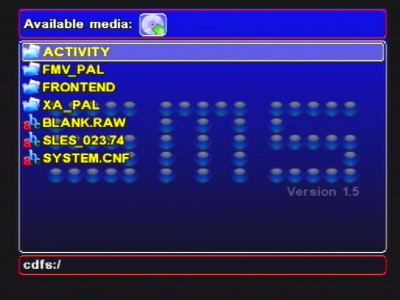
The SMS screen is split into three stacked areas, each drawn inside a rounded rectangle:
- Device menu — the top row of icons, one per source that is currently available. This is the device bar.
- File menu — the middle area: the file/folder browser for whichever device is selected.
- Status line — the bottom strip: the current path on the left and a clock on the right.
Only the active area is highlighted. You move around the device bar with Left/Right, and press Down to drop into the file list for the highlighted device; Left/Right from the top of the file list takes you back up to the bar. A device only earns an icon on the bar once it has been started and something is present. Startup may already remount the launch source to read its settings; otherwise start the source you need (see Autostart vs Start now below).
How devices are named
Each source mounts under a short device name, the same style of prefix PS2 homebrew uses everywhere. Knowing the name helps you read the status line and understand which device you're on.
| Mount name | What it is |
|---|---|
mass0:, mass1:, … | BDM mass storage. USB, MX4SIO microSD, ATA/exFAT internal HDD and i.LINK drives all share this one namespace. The number (N = 0, 1, 2…) is assigned in the order the volumes are discovered, not by which kind of device it is — so mass0: might be USB on one boot and your MX4SIO card on another, depending on what started first. |
mmce0:, mmce1: | MMCE cards. An SD2PSX or MemCard PRO2 in memory-card slot 1 or slot 2. MMCE is not a BDM mass device, so it keeps its own name rather than joining the massN: pool. |
hdd0: | Internal HDD (APA/PFS). The classic Sony hard-drive path, where SMS reads media from a PFS partition on the drive's APA table. |
cdfs | CD/DVD data disc. A burned or pressed data disc (including DVD-Video), read through the console's optical drive. |
cdda | Audio CD. Red-book audio tracks from a music CD. |
smb: | SMB share. A folder shared from a Windows PC or a Samba server, reached over the network adapter. |
udpfs: | UDPFS network drive. A PC folder served by PS2-Servers UDPFSD and discovered automatically over Ethernet. This is file-level UDPFS, not an emulated disk or UDPBD image. |
host: | ps2link host. Files served from a PC over ps2link — a developer/testing path, not something you use for everyday playback. |
massN: number can movemassN: number.Autostart vs Start now
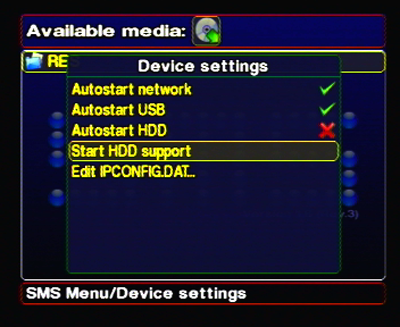
SMS doesn't blindly poll every bus on boot. Instead, each device has an Autostart toggle in the settings menu, and — for anything not currently running — a Start <device> now item that brings it up on demand without a reboot.
Autostart <device>
A per-device on/off toggle. When on, SMS brings that source up automatically every time it boots. There is one toggle for each optional source: Autostart USB, Autostart i.LINK, Autostart MX4SIO, Autostart MMCE, Autostart HDD (the classic APA/PFS path) and Autostart HDD BDM (the ATA/exFAT path). Networking is a single choice presented as three rows — Autostart HOST (ps2dev), Autostart SMB and Autostart UDPFS — and picking one clears the other two.
Start <device> now
When a device is not already running, a matching "Start <device> now" item appears so you can spin it up for this session without turning on Autostart or rebooting — handy for a one-off (plug in a drive, start it, browse it).
Clean config = optional Autostart off
Out of the box, no optional Autostart flag is enabled. You decide what to enable. This keeps boot fast and avoids probing hardware you don't have. Clearing the config returns you to this state (see Where settings live).
Mutual exclusions
Two storage pairs share a physical bus, and the two network implementations share the console's single Ethernet controller. Only one member of each pair can own its resource in a boot.
hdd0:) and the modern
ATA/exFAT path (which appears as a BDM massN: device) both drive the console's internal
ATA bus. They can't run together — whichever starts first owns the bus, and the other backs off. Pick
the one that matches how your internal drive is formatted: APA/PFS for a classic Sony-partitioned drive, ATA/exFAT
for a drive formatted exFAT.host:) and UDPFS
load different drivers for the same EMAC3 Ethernet controller. Whichever network personality starts first owns the
NIC until the next boot. Pick one of Autostart HOST (ps2dev), Autostart SMB or Autostart UDPFS — selecting one automatically clears the other two. If a different network mode is already running when you switch, SMS offers to restart the network in place ("Network is already running. Restart it now to apply?"); accepting resets the IOP and rebuilds the chosen stack without relaunching SMS, declining saves the choice for the next boot. Note that an in-place restart also drops any mounted storage drivers, so they need starting again.Playback sources at a glance
Every storage backend SMS can read, side by side. Click a device to open its full page.
| Device | Bus / how it connects | Filesystem | Mount name | Notes |
|---|---|---|---|---|
| USB | USB port (BDM mass) | FAT32 / exFAT | massN: |
The everyday, no-extras source. Works on any PS2 with a USB port. |
| MX4SIO | Memory-card slot / SIO2 (BDM mass) | FAT32 / exFAT | massN: |
microSD in an MX4SIO adapter. Playback works in this fork — the headline feature. Excludes MMCE. |
| Internal HDD — APA | Internal ATA (APA/PFS) | PFS on an APA partition | hdd0: |
Classic Sony hard-drive path; SMS lists the drive's PFS partitions and mounts the one you pick. Excludes the ATA/exFAT path. |
| Internal HDD — ATA/exFAT | Internal ATA (BDM mass) | exFAT | massN: |
Modern exFAT internal drive over ATA — added in this fork. Excludes the APA path. |
| i.LINK | i.LINK / IEEE 1394 (BDM mass) | FAT32 / exFAT | massN: |
A FireWire drive on models with an i.LINK port. Added in this fork. |
| MMCE | Memory-card slot / SIO2 (non-BDM) | Handled by the MMCE device | mmce0: / mmce1: |
SD2PSX or MemCard PRO2. Its own device, not massN:. Excludes MX4SIO. |
| SMB network | Network adapter (Ethernet) | SMB / CIFS share | smb: |
A Windows or Samba shared folder, set up fully on-screen. Needs a network adapter. |
| UDPFS network drive | Network adapter (Ethernet) | PC folder via UDPFS / UDPRDMA | udpfs: |
Automatic LAN discovery of a PS2-Servers UDPFSD folder. File-level service, not UDPBD. Excludes SMB/host for that boot. |
| CD / DVD | Optical drive | ISO 9660 (incl. DVD-Video) | cdfs |
A burned or pressed data disc, read through the console's own drive. |
| Audio CD (CDDA) | Optical drive | Red-book audio | cdda |
Music CD tracks played directly. |
That's the ten playback sources. Another name, host:, exists for
serving files from a PC over ps2link — it's a developer/testing path, not an everyday media source.
Which source should I use?
Where settings live
Use Save settings after changes. On a remountable launch source, SMS.cfg normally lives beside the ELF even when a memory card is fitted; SMS.smb follows its resolved directory. See Config Files & Paths for card-slot, network-file and fallback rules.
Why do USB, MX4SIO, ATA and i.LINK all share massN:?
Under the hood, those four are handled by the PS2 homebrew BDM (Block Device Manager) layer: each provides a
block device, and a shared FAT/exFAT filesystem driver mounts the volumes it finds as mass0:,
mass1:, and so on. Because they all present the same kind of block device, SMS treats them uniformly —
the same browse-and-play code path works for a USB stick, an MX4SIO card, an exFAT internal drive or a FireWire disk.
The device bar still shows a distinct icon for each so you always know which physical source you're looking at, even
though they share a naming scheme.
Do I need a hard drive or network adapter to use SMS?
No. SMS runs on a bone-stock PS2 and can play straight from USB, MX4SIO, MMCE or a burned disc. The internal-HDD, SMB and UDPFS sources are there if you have the relevant hardware — they're optional extras, not requirements.
Boot-source exception: optional Autostart flags default off, but SMS may start/remount the device holding its ELF/config during startup. A source already visible after first boot does not mean another Autostart choice was saved. See configuration discovery.