CD / DVD / CDDA
The optical drive is where SMS began. Long before USB sticks and SD adapters, SMS's whole reason for existing was to play a good-resolution movie from a burned disc on a completely unmodified PlayStation 2 — no hard drive, no network adapter, no modchip. This page covers the disc types SMS understands, the clever CDDAFS trick that started it all, DVD-Video and data-disc playback, plain Audio CDs, and how to burn discs that your PS2 will actually read.
The disc types SMS understands
SMS reads four kinds of optical media, each with its own history and its own use. All of them work on a stock console; none require a chip.
| Disc type | What it is | What you get |
|---|---|---|
| CDDAFS | Data hidden on an audio-CD layout so a stock PS2 accepts a burned CD-R | Browse a small filesystem of media files burned onto the disc — the original SMS trick |
| DVD-Video | A disc authored in the DVD-Video (UDF) layout, holding your media files | Play video/audio files straight from a burned DVD on an unmodded PS2 |
| Data CD / DVD (ISO) | An ordinary ISO 9660 / UDF data disc | Browse the disc like any other filesystem and open media files on it |
| Audio CD (CDDA) | A standard Red Book music CD | Play the CD's audio tracks directly |
Whichever disc you insert, the flow is the same: SMS identifies it, shows a disc device, and lets you browse or play. The differences below are about how the disc was made, not how you use it once it's in the tray.
CDDAFS — the burned-CD trick that started SMS
A stock PlayStation 2 refuses to boot or read a burned data CD-R — the console's copy protection treats it as an "illegal" disc. Eugene Plotnikov's answer, borrowing an idea from Drakonite's UMCDR, was CDDAFS: a way of storing ordinary data files on a disc that is physically laid out as an audio CD. Because the PS2 happily authenticates an audio-CD-shaped disc, a CDDAFS disc reads on (in Eugene's words) hopefully any PS2 — no modchip needed. This is the very first component of SMS, and the reason the project is a "system" and not just a player.
Building a CDDAFS disc (conceptually)
You do not author a CDDAFS disc on the PS2 — you build it on a PC and burn it. Eugene wrote a companion Windows program, CDXplorer, whose job is to take your files and produce a cue/bin pair describing the special audio-CD-with-data layout. You then burn that cue/bin to a CD-R with a burning program, using a Disc-At-Once mode (Eugene used Nero's "Disc-At-Once / 96" option). CDXplorer can also read an existing CDDAFS disc back, so you can copy your files off again.
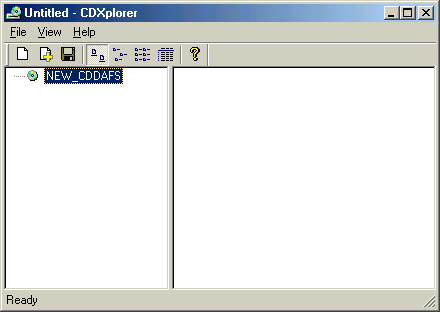
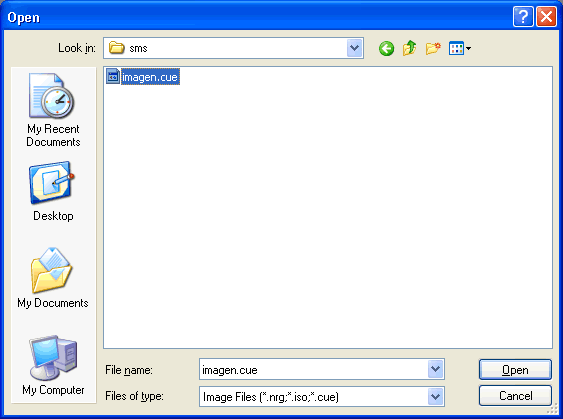
.cue that CDXplorer produced and
writes it to a blank CD-R.Add your files on the PC
In CDXplorer (or a compatible CDDAFS tool), start a new disc and add the media files you want on it — for example a DivX/XviD movie and its soundtrack. The classic use is a single feature-length movie per disc.
Produce the cue/bin
Have the tool generate the cue/bin pair that describes the CDDAFS (audio-CD) layout. This is the image you will burn — not a normal data ISO.
Burn to CD-R with Disc-At-Once
Burn the cue/bin to a blank CD-R using a Disc-At-Once write mode. Because the disc masquerades as an audio CD, the PS2 accepts it. Burn slowly and use good media (see Notes).
Play it in SMS
Put the disc in the PS2, launch SMS, wait for the disc device to appear, drop into the file list, and open your movie. It plays straight off the burned CD-R on a stock console.
How does a CDDAFS disc lay its data out? (the historical detail)
From Eugene's README: track 0 is a control track holding a GUID, a disc name and description, a small disc picture, and a table of 32×32 icon images, followed by a directory table. Each remaining audio track is a directory containing file entries — a name, an icon index, and the file's start offset and size — followed by the file data itself. There is one level of directories (historically capped at 99), and the number of files is limited only by the disc's capacity. Eugene notes fitting an ~800 MB movie onto an ordinary 700 MB disc without trouble, since the audio-CD layout foregoes the extra error-correction overhead of a data disc. This is deep background — you never touch these structures by hand; the PC tool writes them and SMS reads them.
DVD-Video — playing files from a burned DVD
SMS can also read media files from a DVD-Video disc on an unmodified console. Support for reading
.avi (and other) files from DVD-Video discs was added with a cdvd.irx driver that
understands the UDF filesystem DVD-Video uses. In practice this means you can author a burned DVD in the
DVD-Video layout, drop your media files into it, and browse them in SMS exactly like any other device — with the
big advantage that a DVD holds far more than a CD-R, so you are not limited to a single small movie per disc.
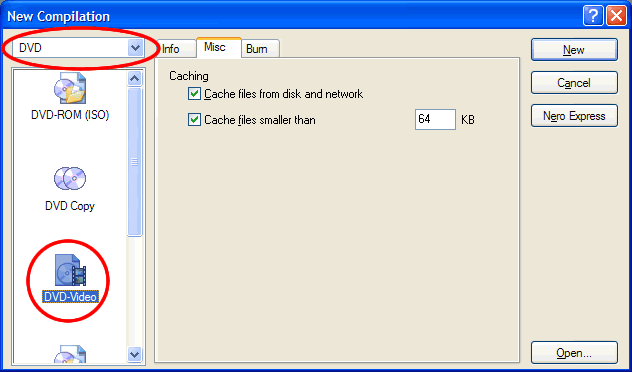
Once burned, the DVD behaves like a data source in SMS: wait for the disc device to appear, enter the file list, and open a file. Video decoding uses the PS2's IPU for colour conversion, the same as from any other device — so DivX / XviD / MPEG-4 AVIs, MPEG program streams and the other supported formats all play from disc. Soft subtitles sitting alongside a video on the disc are picked up too.
Data CD / DVD (ISO)
Beyond the two burned-disc tricks above, SMS also reads ordinary ISO 9660 / UDF data discs — the standard data-disc format. On consoles able to read them, an ISO data CD or DVD simply appears as a disc device you can browse, with your media files inside. This is handy when you already have media on a normal data disc, or when your setup can read data discs directly. The browsing and playback experience is identical to CDDAFS and DVD-Video once the disc is recognised — the only difference is how the disc was mastered.
Audio CD (CDDA)
SMS also plays plain Audio CDs — ordinary Red Book music CDs. Insert a music CD and SMS reads its table of contents, mounts it as an audio disc, and lists its tracks for playback. This is separate from CDDAFS: a CDDAFS disc only looks like an audio CD to sneak data past the copy protection, whereas a genuine Audio CD holds real audio tracks that SMS plays as music.
Notes — burning quality, compatibility & what boots
Burning quality & media
- Burn slowly, on good media. A stock PS2 optical drive — especially an older or well-used one — is far happier reading a carefully burned disc. Use quality blank CD-R / DVD-R media and a conservative write speed.
- CDDAFS needs Disc-At-Once. Because a CDDAFS disc is written as an audio CD, burn its cue/bin with a Disc-At-Once write mode, not Track-At-Once. Eugene developed and tested with Nero's Disc-At-Once/96.
- One movie per CD-R is the classic case. A CDDAFS CD-R is small; if you want more media (or larger files) per disc, a DVD-Video disc holds far more. For libraries of media, a rewritable storage device such as USB or MX4SIO is far more convenient than juggling discs.
Disc & console compatibility
Disc-related settings
SMS's Device settings include a couple of options that affect the optical drive:
| Option | What it does |
|---|---|
| Disable CD/DVD | Turns off SMS's automatic CD/DVD detection, so SMS leaves the optical drive alone. Handy if probing the drive is slow or you never use discs. |
| CD/DVD speed | Controls the optical read speed (low / medium / high). A lower speed can help a marginal drive read a burned disc; a higher speed is faster when your media and drive are healthy. |
SMS also stops the disc spinning while a movie is paused or while you scroll the file list, and stops the drive at startup — small touches that keep the drive quieter and cooler. See the Settings Reference for where these live in the menus.
Optical audio out (a bonus)
If your PS2 is connected to a receiver over its S/PDIF optical output, SMS can pass compressed Dolby Digital (AC3) and DTS audio through to that receiver rather than decoding it on the console — useful for films with surround soundtracks played from disc. This is unrelated to CD burning; it is just what SMS can do with a film's audio once it is playing.
Which disc type should I use?
Optical media is SMS's roots and still works on a bone-stock console — but if you have a USB stick, an MX4SIO microSD adapter, an internal HDD or a network share, those hold far more and never wear out a drive. See the Devices Overview for the full picture.
A short history: why SMS is a "system", not just a player
SMS was created by Eugene Plotnikov (2001–2005) to answer one question: could an unmodified PS2 play a good-resolution DivX movie with sound, straight off a burned disc, with no extra hardware? To make that possible he needed three pieces — hence "system": CDDAFS (the audio-CD data trick so a burned disc would read), CDXplorer (the PC tool that builds the disc), and the player itself (a heavily PS2-optimised port of parts of FFmpeg, using the console's IPU for colour conversion). The community later added USB, HDD, network, a GUI browser, a skin engine and many more formats — and this fork adds MX4SIO, exFAT HDD, i.LINK, MMCE and on-screen network setup — but the optical-disc heart described on this page is where it all began. See Credits & Sources.