
Audio & Playlists
SMS is a media player first and foremost, so it plays music just as happily as video. Point the browser at an MP3, FLAC, OGG, AAC, AC3 or WMA file on any connected device, press ✕, and it plays. This page covers the supported audio formats, the audio player screen, and how to queue up a whole set of tracks with an M3U playlist.
Music folder, an album folder, or loose in the root — and open
them straight from the file list. Everything below works the same on USB, MX4SIO microSD, the internal HDD, i.LINK,
MMCE and SMB network shares.Supported audio formats
SMS recognises audio files by their extension and hands them to the matching decoder. These are the audio formats and file extensions this build plays:
| Format | Extensions | Notes |
|---|---|---|
| MPEG Audio Layer II / III | .mp2 .mp3 .mpa | MP2 and MP3 use the shared MPEG-audio decoder. |
| AAC Main / LC and HE-AAC/SBR | .aac .m4a .mp4 | .aac
is raw ADTS; .m4a is the audio-only ISO-BMFF route. An audio-only .mp4 falls back to the
same reader. |
| AC3 (Dolby Digital) | .ac3 | The same audio format SMS decodes for DVD-style video soundtracks. |
| FLAC | .flac | Mono or stereo; decoded to 16-bit PCM output. |
| Ogg Vorbis | .ogg | Mono or stereo; decoded to 16-bit PCM output. |
| WMA v1 / v2 | .wma | Windows Media Audio carried in an ASF container. This is audio, not WMV video. |
Supported movie/container tracks can additionally use DTS and 16-bit little- or big-endian PCM.
Those codecs are registered for embedded audio, but the browser does not expose standalone .dts or
.wav routes.
Exact implementation limits
| Property | Current behavior / limit |
|---|---|
| Compressed audio packet/sample | 524,224 bytes maximum (512 KiB packet ring minus the mandatory 64-byte allocation overhead) |
| AAC object types | AAC Main and AAC-LC, with SBR/HE-AAC extension processing |
| AAC core sample rates | 8, 11.025, 12, 16, 22.05, 24, 32, 44.1, 48, 64, 88.2 and 96 kHz |
| AAC channels | Mono/stereo output; accepted multichannel AAC is downmixed to stereo |
| FLAC and Ogg Vorbis channels | Mono or stereo only |
| FLAC, Ogg and AAC decoded output | 16-bit PCM |
| Container tracks | Eight table slots; MP4 and MPEG-PS retain at most seven streams including video/subtitles |
| Individual file size | Below 2 GiB for portable seeking through SMS's signed 32-bit file APIs |
Previously reported audio matrix
Earlier project documentation records successful playback of these 20-second audio fixtures. This is a historical reported baseline, not a new test of the current merge. The matrix uses a 44.1 kHz mono tone unless otherwise noted:
| Route | Fixture profile | Result |
|---|---|---|
| MP3 | 192 kbit/s | Passed |
| Ogg Vorbis | Quality 5 | Passed |
| WMA v2 | 128 kbit/s | Passed |
| FLAC | Lossless mono fixture | Passed |
| AC-3 | 192 kbit/s | Passed |
| AAC in M4A | 128 kbit/s | Passed |
| Raw ADTS AAC | 128 kbit/s | Passed |
| MP2 | 192 kbit/s | Passed |
| Audio-only MP4 / AAC | 48 kHz stereo, 128 kbit/s | Passed as music with the visualiser |
AAC Main, HE-AAC/SBR, WMA v1, DTS, embedded PCM and multichannel downmix are source-supported paths but were not separate cases in this hardware fixture matrix.
.mp3) may fail to play. Keep the extension honest — .flac for FLAC,
.ogg for Vorbis, and so on — and if a track refuses to open, double-check that its real format matches
its name.Playing audio
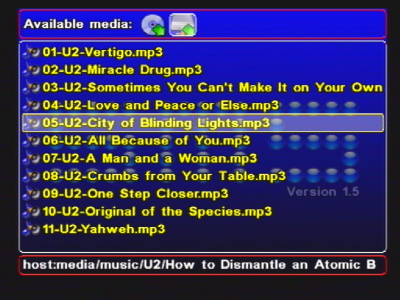
Playing a song is exactly like opening any other file — browse to it and press Cross.
Pick the device
In the device menu (the top row of device icons), press Left/Right to highlight the device your music is on, then press Down to drop into the file list.
Find the track
In the file list, move with Up/Down; use L1/L2 to page-scroll long folders and Triangle to step up a level. The status line at the bottom shows your current path on the left.
Press Cross to play
Highlight the audio file and press ✕. SMS opens the audio player and starts playback.
The audio player screen
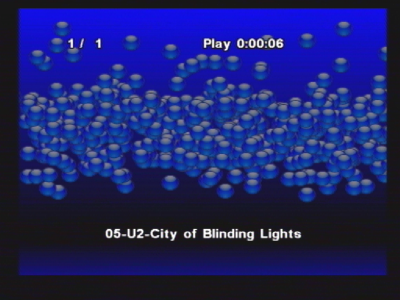
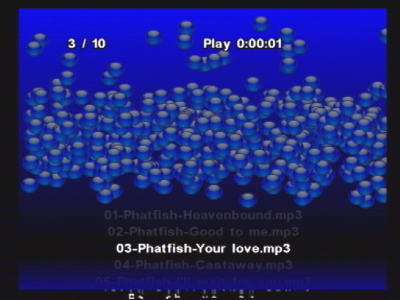
While a track plays, SMS shows its audio player rather than a video picture. From here the pad controls playback (see Controls below). When one track finishes, SMS moves on to the next entry if there is a queue — either the rest of an M3U playlist or the other music in the same folder — otherwise playback ends and you return to the browser.
Can SMS play every song in a folder automatically?
Yes. SMS has long had a "play all the music in this folder" behaviour, so once one track finishes it can roll on to the next file in the same directory rather than stopping after a single song. Simply pressing Cross on a track is enough — it plays on through the rest of the folder's music, skipping non-audio files, and stops when you press Triangle. To play a folder without picking a track first, highlight the folder and choose Play all → Audio. Two related options live in Settings → Player settings → MP3 settings: Randomize playlist and Repeat mode.
They behave differently from what the names suggest. Repeat mode repeats the item you are playing,
not the folder — so with an .m3u playlist it loops the whole playlist, but during folder playback it
loops the current track and never advances. Turn it off if you want a folder to play through.
Playlists (M3U)
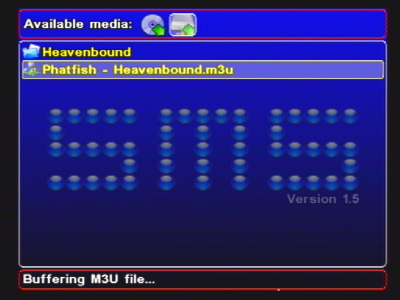
An M3U file (.m3u) is a plain-text list of tracks to play, in order. Instead of opening songs
one at a time, you open the .m3u and SMS queues every track it lists and plays them back to back. SMS
treats .m3u as a first-class media file: it appears in the browser like any other, and pressing
✕ on it starts the whole list.
What goes in an .m3u file
An M3U is just one file path per line. SMS understands both the bare form (one path per line) and the extended
#EXTM3U / #EXTINF form that carries a duration and a display title for each entry. A minimal
example:
#EXTM3U
#EXTINF:213,Opening Track
Music/track01.mp3
#EXTINF:187,Second Track
Music/track02.flac
Music/track03.ogg
A few practical notes on how SMS reads them:
- Relative paths work — a path is taken relative to the folder the playlist lives in, so keeping the
.m3ualongside its tracks is the simplest layout. - Slashes are flexible — Windows-style back-slashes in a path are accepted and treated as forward slashes.
- Mixed formats are fine — a single playlist can mix MP3, FLAC, OGG and the other supported audio formats; SMS picks the right decoder for each entry as it reaches it.
- Titles are optional — with
#EXTINFlines SMS uses the supplied title; without them it falls back to the track's filename.
Controls during playback
Audio uses the same transport controls as video, so if you already know one you know the other:
| Button | Action |
|---|---|
| Select | Pause |
| Start | Resume |
| △ Triangle | Stop and return to the file browser |
| Up / Down | Volume up / down |
| Left / Right | Seek backward / forward within the track |
Stopping a playlist with Triangle drops you back to the browser; there is no need to let the whole queue finish.
Audio inside video
The same decoders power the soundtrack of a movie. When you play an AVI, MP4 or MPEG file, SMS decodes its embedded audio stream — commonly MP3, MP2, AAC or AC3 — right alongside the picture. If the video codec itself is unsupported (for example H.264 or H.265) the supported audio track may still play by itself. So "audio format support" and "a video's soundtrack" are two sides of the same engine; for the video side of things, see Video Playback.
Tips
- Name files clearly. The browser shows filenames, so descriptive names (
01 - Artist - Title.mp3) make navigating an album far easier than cryptic ones. - Keep a playlist with its tracks. Because relative paths are resolved against the playlist's own folder,
storing the
.m3uin the same directory as the songs is the most portable arrangement — copy the folder to another device and it still works. - Use the right extension. Since SMS selects the decoder by extension, an honest extension is the single most reliable way to make sure a track opens on the first try.
- Lossless files increase storage demand. FLAC files are large; playing them from a suitable device such as MX4SIO microSD or the internal HDD is smoother than from a slow source. See Devices Overview.
Code/fixture references: decoder registration, stream table, fixture definitions. See current acceptance gaps.