IGR & Hotkeys
In-Game Reset, the mc0:/BOOT/BOOT.ELF exit chain, and the in-game hotkeys.
In-Game-Reset
IGR Behaviour Modifiers :
POPStarter has his own IGR ( Select + R1 + L1 ). You can change the button combo using one PATCH/TROJAN of the IGR behaviour modifiers archive – or just use a special command for it in POPS/CHEATS.TXT or POPS/GAME/CHEATS.TXT.
| File name | Button combo | Action |
| TROJAN_0.BIN | L1 + L2 + R1 + R2 + ✕ + ↓ | Opens the IGR menu. |
| TROJAN_1.BIN | Select + Start | Opens the IGR menu. |
| TROJAN_2.BIN | L1 + L2 + R1 + R2 + Select + Start | Opens the IGR menu. |
| TROJAN_3.BIN | L1 + L2 + R1 + R2 + ✕ + ↓ | Terminates POPS (no IGR menu). |
| TROJAN_4.BIN | Select + Start | Terminates POPS (no IGR menu). |
| TROJAN_5.BIN | L1 + L2 + R1 + R2 + Select + Start | Terminates POPS (no IGR menu). |
| PATCH_0.BIN | (none) | Disables the IGR menu. |
- How to install :
Copy one of the PATCH/TROJAN files to the VMC game folder or to the POPS folder.
When copied to a VMC game folder, it’s used on the relative game only.
When copied to the POPS folder, it’s used on all the installed games.
- What to do if you don’t want to overwrite your existing TROJAN_#.BIN/PATCH_#.BIN file :
-
Change the number in the name of the file you want to copy ;
-
Open the file you want to copy with a hexadecimal editor, change the number in its header according to the one of the new file name ;
-
And finally copy the edited file.
POPStarter will refuse to load the PATCH/TROJAN file if the number in its filename doesn’t match the number in its header.
IGR Textures:
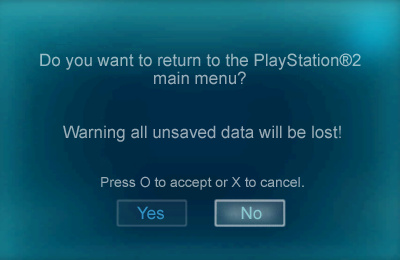
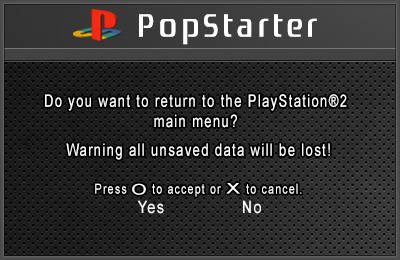
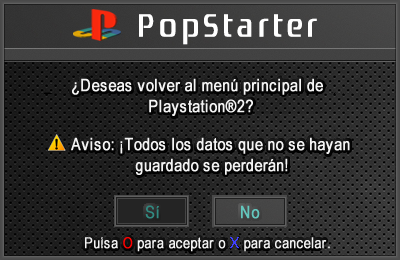
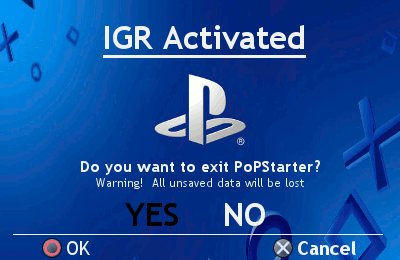
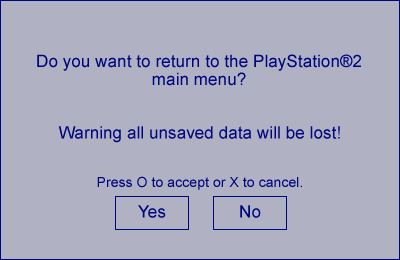
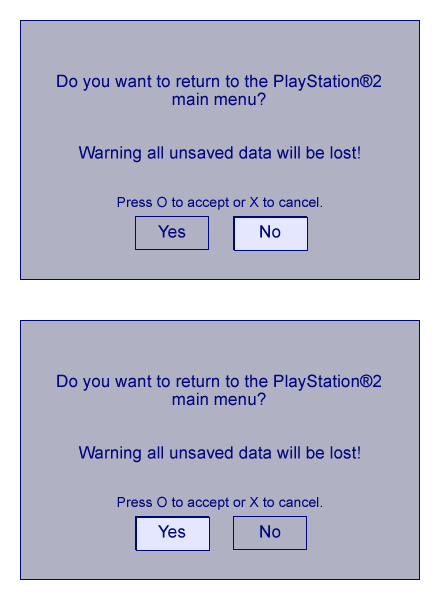
POPStarter has a built-in IGR loader texture making you able to change the japanese IGR screen with one of your language. Just drop the “IGR_BG.TM2”, “IGR_NO.TM2” and “IGR_YES.TM2” files into your POPS folder.
Example :
__common/POPS/IGR_BG.TM2
__common/POPS/IGR_NO.TM2
__common/POPS/IGR_YES.TM2
Note : .TM2 extension MUST be UPPERCASE for internal HDD – or it won’t work.
Some IGR textures made by the guys @ASSEMbler. Kudos to them. Credits go to their original authors.
| Preview | Author | Chinese | English | French | Spanish | Polish | Portuguese | German |
| arkl1t32 | – | X | X | – | X | – | – | |
| arkl1t32 | – | X | X | – | X | – | – | |
| arkl1t32 | – | X | X | – | X | – | – | |
| arkl1t32 | X | X | X | – | X | X | – | |
| arkl1t32 | – | X | X | – | X | – | – | |
| gledson999 | – | X | X | – | – | X | – | |
| El_Patas (mod of gledson999’s) | – | X | – | – | X | – | – | |
| LopoTRI | – | X | – | – | – | – | X | |
| Download links for language packs | Chinese | English | French | Spanish | Polish | Portuguese | German |
“Exit to [name of app]” function :
POPStarter has a built-in launcher added to the in-game reset function. It looks for mc0:/BOOT/BOOT.ELF then mc1:/BOOT/BOOT.ELF. If not found/invalid, it exits to the PS2 browser.
If you want to exit game to some app (uLE_kHn for example), name it BOOT.ELF and place it in the BOOT folder of your memory card.
Related stuff :
You may want to give a look at this :
Hotkeys
| Hotkeys | Description | Notes |
| Select + L1 + R1 | Native In-Game-Reset. | Can be changed using the IGR Behaviour Modifiers. |
| Select + L1 + R2 | Enables the smooth texture mapping. | Can be done using $SMOOTH special command in CHEATS.TXT file. |
| Select + L2 + R1 | Disables the smooth texture mapping. | |
| Select + R1 + R2 | Turns the scanlines generator ON. | |
| Select + L1 + L2 | Turns the scanlines generator OFF. | |
| Select + L2 + R2 + △ | Opens the PS1 CD lid. | (1) |
| Select + L2 + R2 + ↑ | To Insert Disc 1 (DISCS.TXT line 1). | |
| Select + L2 + R2 + → | To Insert Disc 2 (DISCS.TXT line 2). | |
| Select + L2 + R2 + ↓ | To Insert Disc 3 (DISCS.TXT line 3). | |
| Select + L2 + R2 + ← | To Insert Disc 4 (DISCS.TXT line 4). | |
| Select + L2 + R2 + □ | Closes the PS1 CD lid. | |
| Select + L2 + R2 + ✕ | PS1 software reset system. |
(1) If used a with BIOS.BIN, MC manager and CD Player can be reached pressing the hotkeys at game startup. Closing the lid will run the game.
BIOS & OSD Handlers
BIOS handler :
POPStarter has a BIOS handler so you can use your own external PlayStation BIOS dump in remplacement of POPS built-in BIOS. You have to rename it as BIOS.BIN and place it into the VMC game folder (example : __common/POPS/GAME/BIOS.BIN for internal HDD) and POPStarter will use it for this game. You can also place it into the POPS folder (__common/POPS/BIOS.BIN for internal HDD) and your BIOS will be used for all your games (this is NOT recommended). If no BIOS.BIN is found in VMC game folder (or in POPS folder), POPS will use its built-in BIOS.
Though using a BIOS with a game doesn’t improve compatibility, you can use that feature to manage your PS1 MC saves and listen to your CDDA game tracks…
OSD handler :
POPStarter has an OSD replacement image handler. The OSD replacement image have to be named as OSD.BIN and placed into the VMC game folder of your game (or in POPS folder). When an OSD replacement image is found in your VMC game folder (or in POPS folder), it will be injected in the built-in BIOS.
Notes :
-
When using a OSD replacement image, “BIOS.BIN” is ignored ;
-
2 OSD replacement examples were released by krHACKen : Import Player CD v1.4 and CodeBreaker Release 2.00 Build 2E. They are copyrighted so I will not share them here ;
-
To create your own OSD files, you need a tool named OSD.BIN Maker ;
-
More infos about the OSD replacement image @ASSEMblergames.
Description of the header structure of an OSD replacement image :
===================================================
OSD Replacement Image [Version 1] Header Structure
===================================================
Offset 0h to 8h     = Identifier (PS-X OSD)
Offset 8h to Ch     = NULL NULL NULL NULL
Offset Ch       = Image version (Currently 0x01 for Version 1, POPStarter Rev.10 compatible)
Offset Dh       = NULL
Offset Eh       = Program/OSD build, user defined
Offset Fh       = NULL
Offset 10h to 14h   = Load Address
Offset 14h to 18h   = Entrypoint
Offset 18h to 1Ch   = RESERVED RESERVED RESERVED RESERVED
Offset 1Ch to 20h   = Size of the OSD (loadable segment size, the header length is excluded)
Offset 20h to 34h   = Program/OSD name, 20 ASCII chars max, terminated with 0x00 (user defined)
Offset 34h to 40h   = UNDEFINED (must be NULL)
Offset 40h      = Executable segment start
========================================
LIMITATIONS AND RESTRICTIONS [Version 1]
========================================
+ The file identifier must be "PS-X OSD"
+ The name of the OSD replacement (in the header, starting from offset 20h) must be at least 1 ASCII character long;
the length can be up to 20 characters
+ The OSD Load Address and the Entrypoint have to be multiples of 10000h
+ The image version (offset Ch) and the OSD build (offset Eh) cannot be NULL
+ NULL/RESERVED/UNDEFINED fields have to be NULL
+ The size of the OSD replacement file (OSD.BIN) has to be the header length PLUS the OSD size
[IGR] Make your own IGR textures
Based on infos shared by arkl1t32 @ASSEMblergames
Software requirements :
-
A TIM2 editor, such as OPTPiX iMageStudio;
-
A hex editor, such as HxD.

Sample files : here.
Included :
-
PSD file with guidelines ;
-
3 image files, as .bmp ;
-
3 image files, as .TM2 ;
-
static & animated previews ;
-
IGR replacement, compiled as PATCH_1.BIN file.
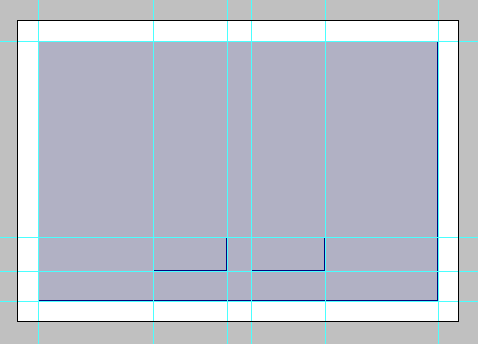
- Using your favorite graphic editor, create 3 .bmp files with the above dimensions :
-
IGR_BG : 400 × 260 px
-
IGR_YES & IGR_NO : 74 × 34 px
Use the PSD file with guidelines if need to crop properly.
-
Open these 3 files with a TM2 editor & save them as .TM2 files ;
-
Open IGR_YES.TM2 and IGR_NO.TM2 with a hex editor and delete the last 8 digits in last offset (1D80) ;
-
You can either : – place your .TM2 files as they are in the POPS folder (named as IGR_BG.TM2, IGR_NO.TM2 & IGR_YES.TM2) ;
OR – [optionnal step] compiled them as a PATCH_#.BIN ; -
If you want to compile them as PATCH_#.BIN, use toolbox command ;
toolbox.exe -igrpix "background.tm2" "no_button.tm2 "yes_button.tm2"
- Place your PATCH_#.BIN file into POPS folder.
Result :
Feel free to submit it @ASSEMblergames and it will be added to the wiki.
If you want to submit language versions :
- ENGLISH :
1. Do you want to return to the PlayStation®2 main menu ?
2. Warning all unsaved data will be lost!
3. Press O to accept or X to cancel.
4. Yes
5. No
- FRENCH :
1. Voulez-vous retourner au menu principal de la PlayStation®2 ?
2. Attention : toutes les données non sauvegardées seront perdues.
3. Appuyer sur O pour valider ou sur X pour annuler.
4. Oui
5. Non
- GERMAN :
1. Möchten Sie POPStarter verlassen ?
2. Nicht gespeicherte Daten gehen verloren !
3. (untranslated)
4. Ja
5. Nein
- POLISH :
1. Czy chcesz powrócić do głównego menu PlayStation®2?
2. Uwaga, wszystkie niezapisane dane zostaną utracone!
3. Wciśnij O by potwierdzić, X by anulować.
4. Tak
5. Nie
- PORTUGUESE :
1. Você deseja retornar para o menu principal do Playstation®2?
2. Alterta: Todos os dados que não forem salvos, serão perdidos!
3. (untranslated)
4. Sim
5. Não
- SPANISH :
1. ¿Deseas volver al menú principal de Playstation®2?
2. Aviso: ¡Todos los datos que no se hayan guardado se perderán!
3. Pulsa O para aceptar o X para cancelar.
4. Si
5. No
Recovered from ShaolinAssassin's IGR · Hotkeys · BIOS OSD Handlers · IGR Textures wiki pages.
Images & screenshots
Images & screenshots

IGR, in-game reset, and the exit chain
In-Game Reset (IGR) is POPStarter's pad-driven exit/reset. With no modifier set, the default combo (community-reported L1+Select+Start) opens a Japanese-language IGR menu (the skin is enabled by default in the config table). You override it with one of six $IGR# CHEATS.TXT commands (or the equivalent TROJAN_0..5.BIN) - and only one IGR behaviour is active at a time. The canonical CHANGES.TXT pins the combos exactly: $IGR0/$IGR3 use L1+L2+R1+R2+X+Down, $IGR1/$IGR4 use Start+Select, $IGR2/$IGR5 use L1+L2+R1+R2+Start+Select; the IGR0/1/2 trio OPENS the menu while IGR3/4/5 TERMINATE POPS directly with no popup. $IGR5 (the OPL-style no-popup macro) was broken in earlier r13 builds and fixed only in the 2019-06-05 final - so the canonical package is the one where it reliably works. $NOIGR (== PATCH_0.BIN) disables IGR entirely. CORRECTION: the widely-mirrored Portuguese manual swaps $IGR4 and $IGR5; the CHANGES.TXT ordering above is authoritative.
The EXIT CHAIN (added Beta 13, 2015-12-07, gated by config $424=0x01): on IGR quit AND on POPStarter's own quit-on-failure, the launcher tries mc0:/BOOT/BOOT.ELF, then mc1:/BOOT/BOOT.ELF, and if neither is found/valid it drops to the PS2 Browser (OSDSYS, which runs FMCB/FHDB if installed). Two crucial caveats: there is NO documented path override (a user publicly asked krHACKen for one in 2016 and it was never implemented - BOOT.ELF must physically live on a memory card), and if POPS itself cannot initialise (can't load modules or open the VCD) the launcher is bypassed and you fall straight to the OSD.
PRACTICAL RECIPES: to return to your own launcher, name it BOOT.ELF at mc0:/BOOT/. To return to OPL on a setup with no usable BOOT.ELF, drop the 2020-03-21 PATCH_9.BIN in the POPS folder and repoint FMCB's OSDSYS button action to OPNPS2LD.ELF. To kill POPS instantly with no menu, use $IGR5 (or TROJAN_5.BIN). To remove IGR entirely, use $NOIGR (or PATCH_0.BIN).
Cross-sourced quick-reference cards (provenance-tagged)
$IGR0 primary igr
$IGR1 primary igr
$IGR2 primary igr
$IGR3 primary igr
$IGR4 primary igr
$IGR5 primary igr
$NOIGR primary igr
Default IGR trigger (no modifier) near-primary igr
BOOT.ELF exit chain primary igr
No documented BOOT.ELF path override near-primary igr
Quit-on-failure uses the same BOOT.ELF chain primary igr
Untested PS1 software-reset hotkey (Select+L2+R2+X) primary igr
All 4 wiki pages in this topic
Every recovered page filed under this section — including the deep-reference pages not embedded above.