IGR Textures
Recovered from the ShaolinAssassin wiki · snapshot 20200810125809
[IGR] Make your own IGR textures
Based on infos shared by arkl1t32 @ASSEMblergames
Software requirements :
-
A TIM2 editor, such as OPTPiX iMageStudio;
-
A hex editor, such as HxD.

Sample files : here.
Included :
-
PSD file with guidelines ;
-
3 image files, as .bmp ;
-
3 image files, as .TM2 ;
-
static & animated previews ;
-
IGR replacement, compiled as PATCH_1.BIN file.
- Using your favorite graphic editor, create 3 .bmp files with the above dimensions :
-
IGR_BG : 400 × 260 px
-
IGR_YES & IGR_NO : 74 × 34 px
Use the PSD file with guidelines if need to crop properly.
-
Open these 3 files with a TM2 editor & save them as .TM2 files ;
-
Open IGR_YES.TM2 and IGR_NO.TM2 with a hex editor and delete the last 8 digits in last offset (1D80) ;
-
You can either : – place your .TM2 files as they are in the POPS folder (named as IGR_BG.TM2, IGR_NO.TM2 & IGR_YES.TM2) ;
OR – [optionnal step] compiled them as a PATCH_#.BIN ; -
If you want to compile them as PATCH_#.BIN, use toolbox command ;
toolbox.exe -igrpix "background.tm2" "no_button.tm2 "yes_button.tm2"
- Place your PATCH_#.BIN file into POPS folder.
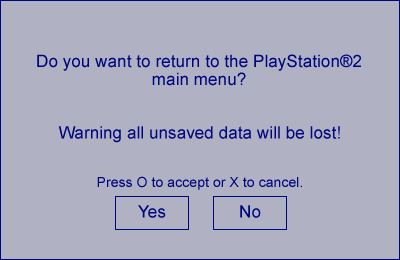
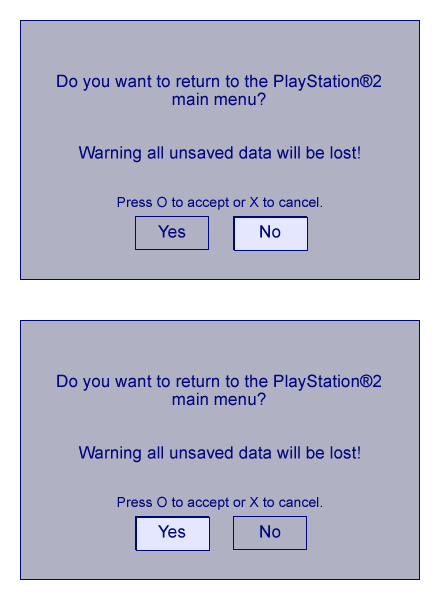
Result :
Feel free to submit it @ASSEMblergames and it will be added to the wiki.
If you want to submit language versions :
- ENGLISH :
1. Do you want to return to the PlayStation®2 main menu ?
2. Warning all unsaved data will be lost!
3. Press O to accept or X to cancel.
4. Yes
5. No
- FRENCH :
1. Voulez-vous retourner au menu principal de la PlayStation®2 ?
2. Attention : toutes les données non sauvegardées seront perdues.
3. Appuyer sur O pour valider ou sur X pour annuler.
4. Oui
5. Non
- GERMAN :
1. Möchten Sie POPStarter verlassen ?
2. Nicht gespeicherte Daten gehen verloren !
3. (untranslated)
4. Ja
5. Nein
- POLISH :
1. Czy chcesz powrócić do głównego menu PlayStation®2?
2. Uwaga, wszystkie niezapisane dane zostaną utracone!
3. Wciśnij O by potwierdzić, X by anulować.
4. Tak
5. Nie
- PORTUGUESE :
1. Você deseja retornar para o menu principal do Playstation®2?
2. Alterta: Todos os dados que não forem salvos, serão perdidos!
3. (untranslated)
4. Sim
5. Não
- SPANISH :
1. ¿Deseas volver al menú principal de Playstation®2?
2. Aviso: ¡Todos los datos que no se hayan guardado se perderán!
3. Pulsa O para aceptar o X para cancelar.
4. Si
5. No
Images & screenshots